Yes you always have to be in communication with your referrals.
And yes, there’s a “right” way of doing this, and a wrong way.
Here’s my take..
WATCH THIS VIDEO:
If this helps you out please comment below…
- Geoff Stephen

Yes you always have to be in communication with your referrals.
And yes, there’s a “right” way of doing this, and a wrong way.
Here’s my take..
WATCH THIS VIDEO:
If this helps you out please comment below…
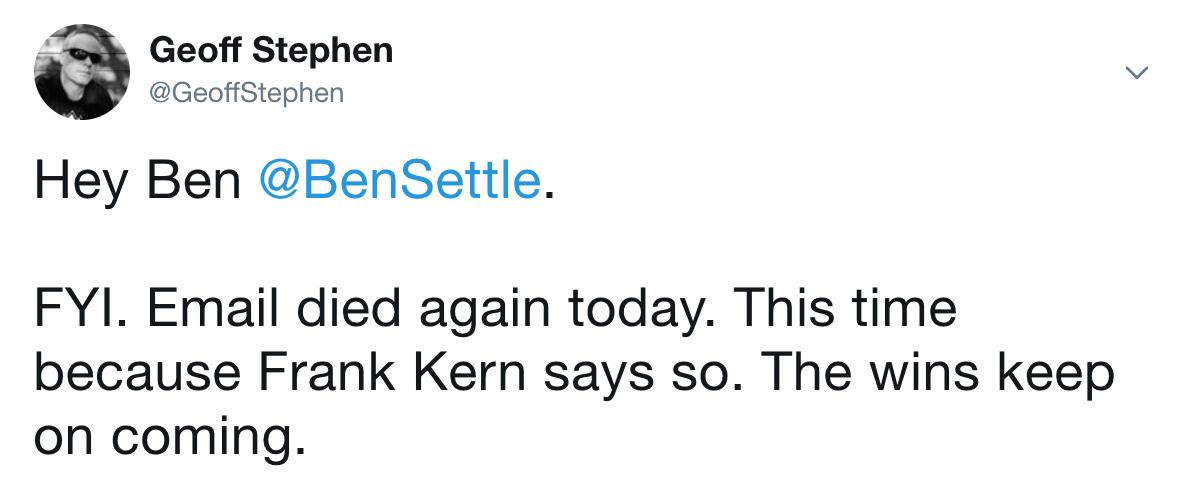
Had this quick convo yesterday with my friend (and fellow email crusher) Ben on Twitter.
Here’s what I tweeted out based on a real message I got:
VIEW IMAGE
What does it tell you when someone says something insane like “email marketing is dead”?
What it really means is, “I suck at email, so you should suck at it too. And I’m a guru, so… do as I say, not as I do.”
Fortunately, I love it when people “of influence” say stupid things like this (if it’s true).
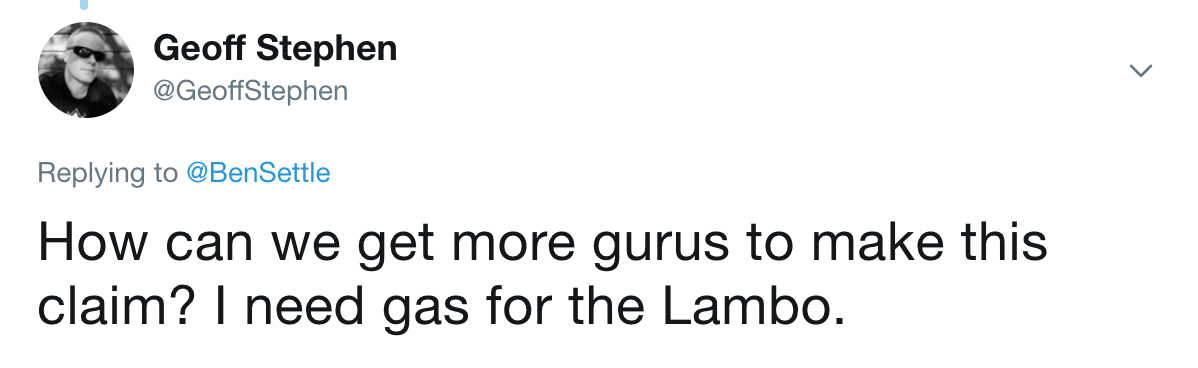
Why? Because it makes it that much more profitable for people like us to capitalize on email:
VIEW IMAGE
(.. and no, I don’t own a Lambo. It’s an internet marketing figure of speech for bro-marketing ridiculous income claimers.)
It’s kind of about learning from people that actually DO what they teach. Funny that.
Anyhoo. Email will always be the highest-profit medium for selling online. Learn it and earn it.
Join us here:
=> The non-guru way to actually make money with email.
Feel free to follow me on Twitter for more exciting blah d. blah: @GeoffStephen
Thanks,
– Geoff Stephen

P.S. Get my in-demand “Marketing Fundamentals” Boot Camp for $12 for my list only (that’s you’s). Get your feets in the door..
So I did this quick email test the other day.
Actually it was kind of by accident..
.. but it proved what I’ve been doing all along.
I tested out two separate and unique subject lines, for the exact same email.
One of them I wanted to get placed in Gmail’s “promotions” tab.
The other I wanted to land in either the “updates” tab or direct to inbox.
Again, 2 subject lines, same email copy.
What I did worked for what I was trying to do..
.. which leads me to further understand how to get our email delivered where I want it to go.
It all goes back to how we write emails here at EmailReboot.com.
It all comes down to “having that daily conversation with your list”.
Simply put..
If your email subject “looks” like it has ANYTHING to do with marketing/selling/promoting..
.. guess where it ends up –> The Promotions Tab.
(which nobody ever looks at)
I can show you exactly what my results were and how I got them..
You’d be surprised which subject lines landed me in promotions.
Just become an EmailReboot subscriber and you’re on your way to BETTER, more profitable email.
Sales every day? Yup. Sounds good to me 🙂
Here ya go:
https://emailreboot.com/product/
See ya.
– Geoff Stephen

P.S. Get my in-demand “Marketing Fundamentals” Boot Camp for $12 for my list only (that’s you’s). Get your feets in the door..
Opinions are like… yeah you know.
Everybody’s got one.
And I get a LOT of opinionated email replies.
Usually about my take on how things work in marketing.
Because, as you know, I don’t sugar-coat. I tell it like it IS.
And I get happy little replies like, “Geoff I think it would work better if y’all did it THIS way.”.
..And I KNOW these are coming from those Cheeto inhaling, couch indenting, Oprah watchers, who have never ventured outside their virtual “coffee table” offices to satisfy their hopeum-laced dreams of internet marketing grandeur.
ie. They haven’t done shit (and probably ne’er will).
Here’s the thing.
They have opinions. I have results.
That’s the distinction, really.
No advice that I give on marketing is based on Geoffy’s hopes and dreams.
They’re always based on data and results. Simple, really.
I actually do stuff. I report back. Easy McPeasy.
So? Save your opinions until after you have results to back it up.
If you have results to speak of, I’d be more than happy to talk.
Until then.. listen and learn.
See ya.
– Geoff Stephen
P.S. Subscribe today to my newsletter and learn the evil ways of guaranteed daily sales using good ol’ email. Or don’t, your choice.
–
Hey NPN’ers,
I have added a new feature in your NPN backoffice that allows you to collect the info of your new trial members and add it to your MMPro contact lists.
Watch this video:
Any questions let me know.
More info:
http://globalnpn.com/
Geoff.